You Don't Need Expensive Tools to Play with Silicon
So you're sold on RISC-V. You've seen the vision. Now comes the question every beginner asks: "Okay, but how do I actually start?"
In the previous post, we explored why RISC-V is the "Linux of hardware" and how it's making processor design accessible to everyone. Now let's talk about the actual tools that let you build, simulate, and hack on real processors.
The good news? You don't need expensive licenses, proprietary toolchains, or a university lab. The hardware hacking stack is wide open and it's free.
Breaking the Myth: Hardware != Expensive
When most people think "chip design," they imagine locked-down corporate tools with five-figure licenses: Cadence, Synopsys, Mentor Graphics. And yeah, industry still uses those. But here's what's changed in the last decade:
The FOSS hardware ecosystem has grown up.
Just like Linux gave us gcc, vim, and git, the hardware world now has Yosys, Verilator, and OpenROAD. Students, hobbyists, and even startups are designing real chips with these tools: chips that actually get manufactured and work.
The barrier to entry isn't money anymore. It's just knowing where to look.
The Open Hardware Toolchain: Your New Best Friends
Let's walk through the essential tools that take you from "I have an idea" to "I have a working processor." Think of this as your hardware hacker starter pack.
1. Simulation: Verilator & Icarus Verilog
Simulation is basically running your hardware design in software to see how it behaves, think of it like a test drive before you commit to building the real thing. Writing hardware code (Verilog/VHDL) without simulation is like coding in C without ever compiling. You need to see if your logic actually works: does your processor fetch the right instruction? Does your ALU compute correctly?
Verilator is the Usain Bolt of the bunch. It converts your Verilog code into C++ and compiles it into a native executable, which makes it insanely fast and perfect for simulating large designs like full processors. It's cycle-accurate, meaning it simulates your design clock cycle by clock cycle, just like the real hardware would run. The trade-off? It's a bit more complex to set up, but once you get it running, you'll appreciate the speed :)
Icarus Verilog is the friendlier option for beginners. It's an event-driven simulator that's simpler to use and doesn't require you to write testbenches in C++. Just write your Verilog, compile it with the command iverilog, and run it with vvp. Pair it with GTKWave to visualize signals as waveforms, and you've got a complete simulation workflow. It's not as fast as Verilator for huge designs, but for learning and debugging, it's perfect.
Try simulating a simple counter or a full adder. Watch the waveforms change. It's oddly satisfying to see logic come alive on your screen.
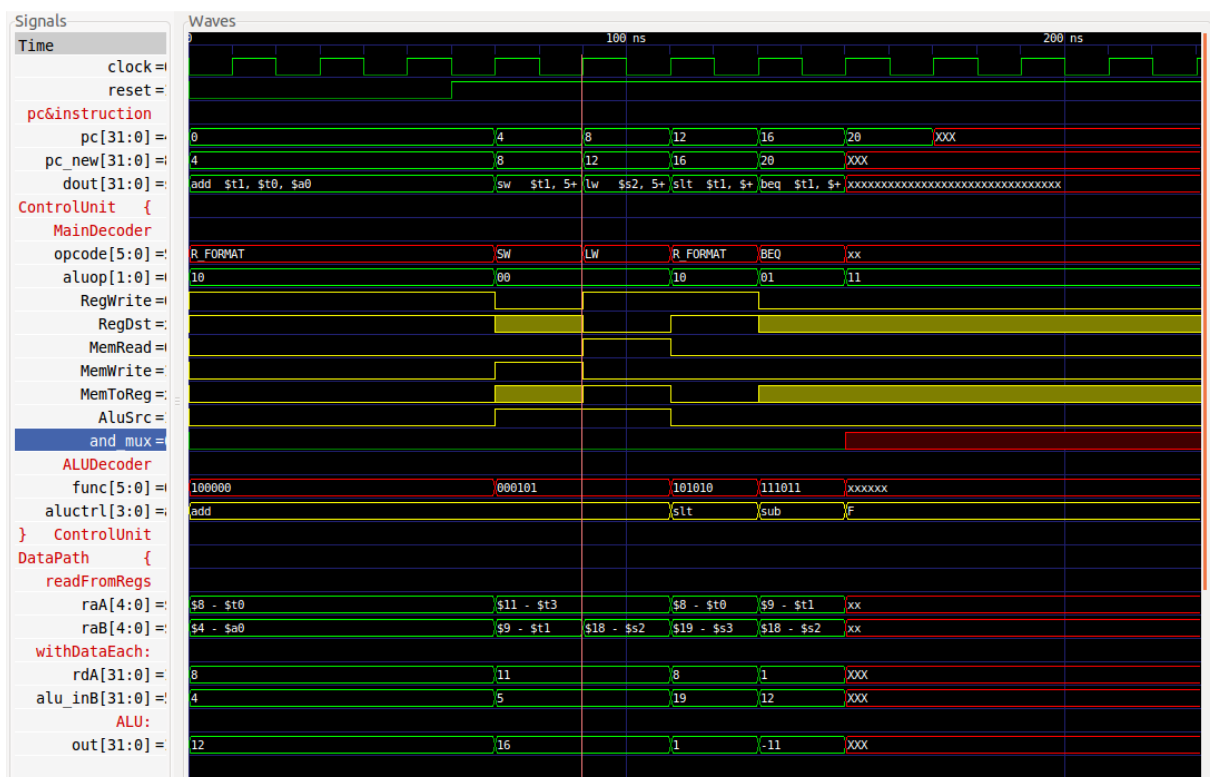
A GTKWave waveform illustrating the timing of control, datapath, and ALU signals in a CPU core.
2. Synthesis: Yosys
This is where your abstract "hardware description" becomes real logic that could be etched onto silicon. Yosys converts your high-level Verilog code into a gate-level netlist: actual logic gates like AND, OR, and flip-flops.
Think of Yosys as the gcc of hardware. It compiles your design into something a chip fab (or FPGA) can understand. Yosys is scriptable, modular, and works with a ton of FPGA and ASIC flows. It's used in actual chip tapeouts through projects like Google's open PDKs (a PDK, or Process Design Kit, is basically the instruction manual for a specific chip fabrication process: it tells your tools how that particular factory makes transistors).

The synthesis flow: your high-level hardware description gets compiled down to actual logic gates that can be implemented in silicon.
So, feed Yosys a simple Verilog module, run synthesis, and look at the output netlist. Watching your code transform into gates is pretty cool.
3. Place & Route: OpenROAD
Synthesis gives you logic. Place & route gives you geometry: where each gate sits, how wires connect, timing constraints, power routing. This is the final step before manufacturing.
OpenROAD is an open-source ASIC flow that takes your gate-level netlist and turns it into an actual physical chip layout. It handles everything from floorplanning (deciding where blocks go) to detailed routing (connecting all the wires) to timing analysis (making sure your chip actually works at the speed you want).
What makes OpenROAD special is that it's not just a toy project, it's being used in real chip tapeouts. Companies and researchers are using it with Google's SkyWater 130nm PDK and platforms like ChipFlow to manufacture actual silicon. The same flow that powers multi-million dollar chip designs is now available to anyone with a laptop.
The workflow is surprisingly straightforward: feed it your synthesized netlist, tell it about your target technology (via a PDK), set your constraints, and let it do its thing. It'll optimize placement, route all the connections, check timing, and spit out a GDSII file, the final layout that gets sent to the fab.
So, you're literally designing the physical layout of a chip. This used to be reserved for grad students and industry engineers and now it's something you can mess around with on a Tuesday night.
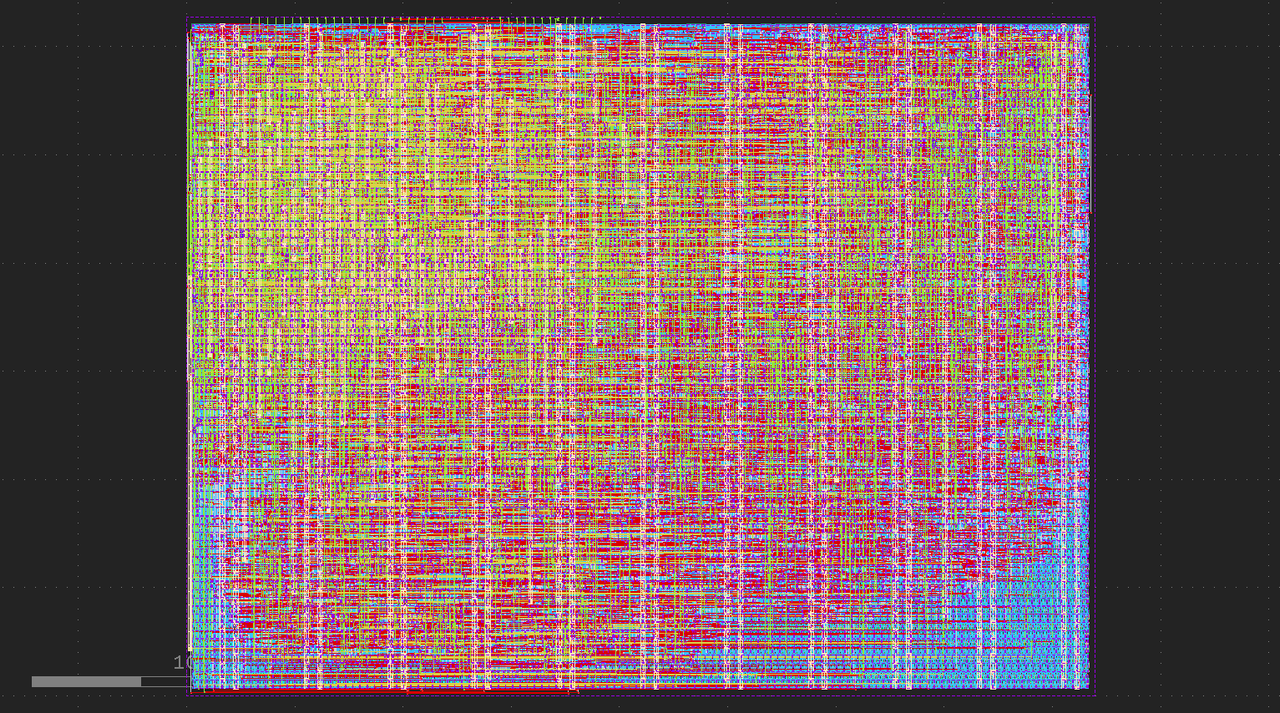
My chip layout post place & route. Those colorful rectangles and wires? That's real geometry heading to the fab.
4. RISC-V Cores: The Playground
Now that you have the tools, what do you build? Here's where pre-existing RISC-V cores come in, think of them as reference designs you can learn from, modify, extend and even contribute to.
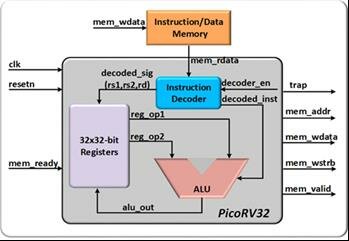
PicoRV32 is arguably the most famous RISC-V core, tiny and simple around 1000 lines of Verilog. Perfect for beginners because you can actually read and understand the whole thing. Simulate it, run a "Hello World" program, trace how instructions execute.
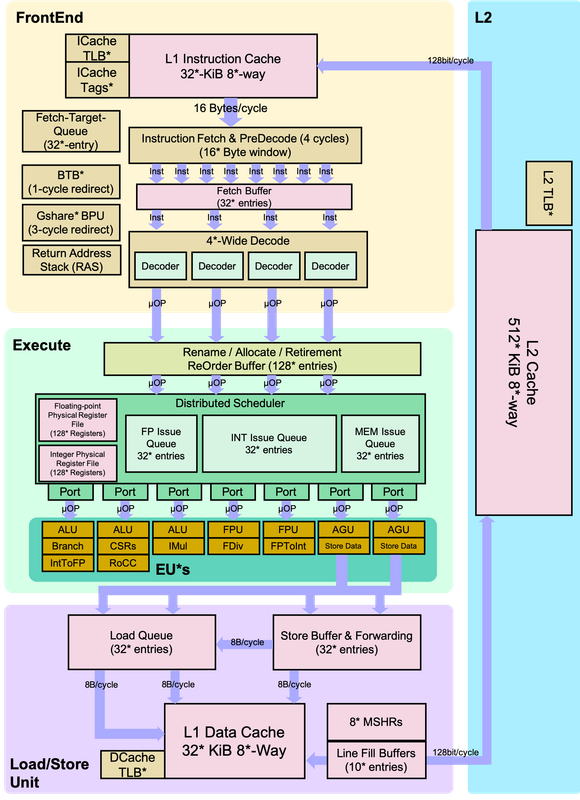
BOOM (Berkeley Out-of-Order Machine) is the other end of the table, a high-performance, Out-of-Order RISC-V core. When you're ready to level up, BOOM teaches you modern processor techniques. Study the pipeline, see how dynamic scheduling works.
RISCape (shameless plug) is my 5-stage pipelined RISC-V core. Built by a student, for students. If I can do it, you absolutely can too. Fork it, break it, fix it, extend it. That's how you learn.
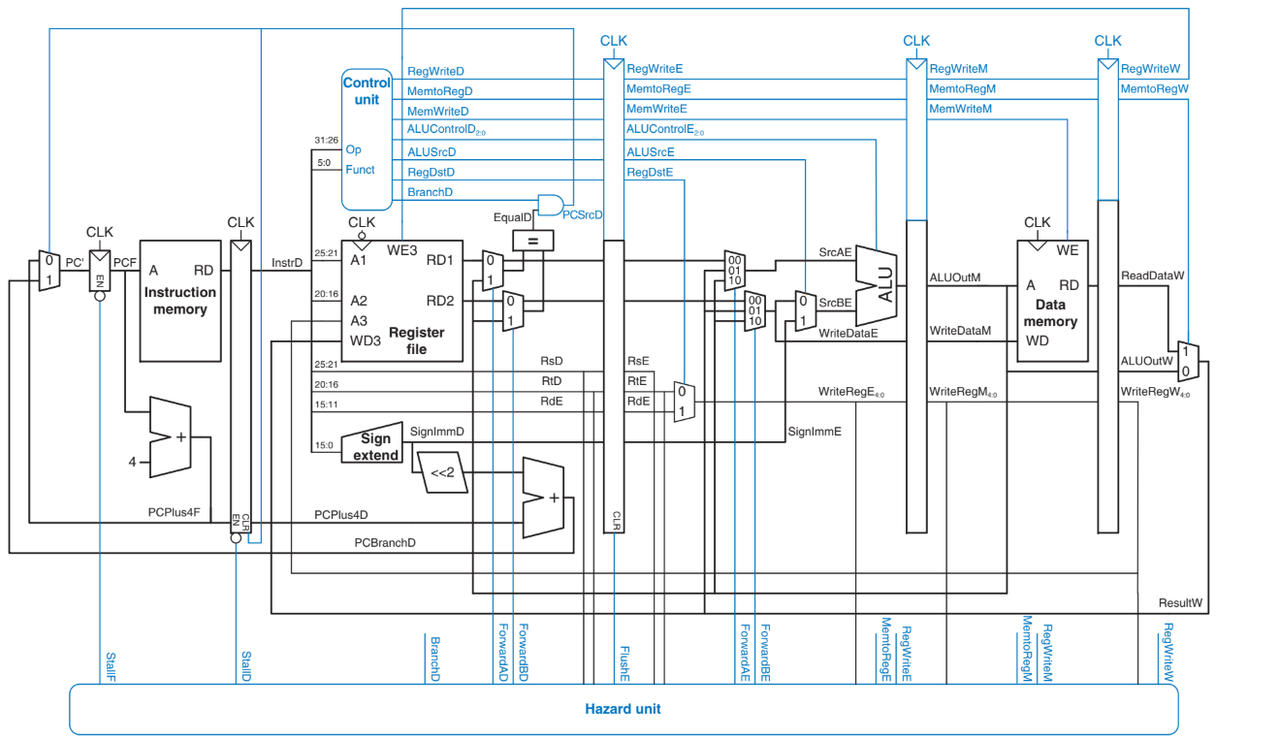
We can see the three levels of RISC-V cores: PicoRV32 for learning the basics, RISCape for understanding pipelines, BOOM for exploring modern processor techniques.
5. Tiny Tapeout: Your Shot at Real Silicon
Remember all those tools we just talked about? Tiny Tapeout is where you actually use them to manufacture real chips.
Tiny Tapeout is a platform that makes chip fabrication accessible. Instead of paying hundreds of thousands of dollars for a solo manufacturing run, multiple designs get combined into one "shuttle" and share the cost. For around $100-150, you can get your design fabricated in actual silicon using processes like IHP SG13G2 or SkyWater 130nm. No company backing, no research lab required, just you, your design, and a submission deadline.
I first heard about Tiny Tapeout while working on a System-on-Chip (SoC) project with some friends. The idea that students could tape out real chips felt almost too good to be true. My first real dive was through a crowd-sourced competition where participants contributed peripherals for a RISC-V SoC. That got me hooked, read about my submission here!
After that, I decided to go all in and do a dedicated tapeout of my own: Herald, a co-processor that handles CORDIC (coordinate rotation) and MAC (multiply-accumulate) operations. The workflow? Design in Verilog, simulate it, synthesize with Yosys, place & route with OpenROAD, verify timing, submit your GDSII file, and wait for the shuttle to tape out.
Sounds smooth, right? It wasn't. Errors after errors timing violations, things that worked in simulation but failed in hardware checks. But here's the thing: the Tiny Tapeout community is incredibly active. Ask a question on Discord (even if you think it's silly), and someone will help. The barriers aren't technical anymore, they're just learning curves, and the community helps you climb them.
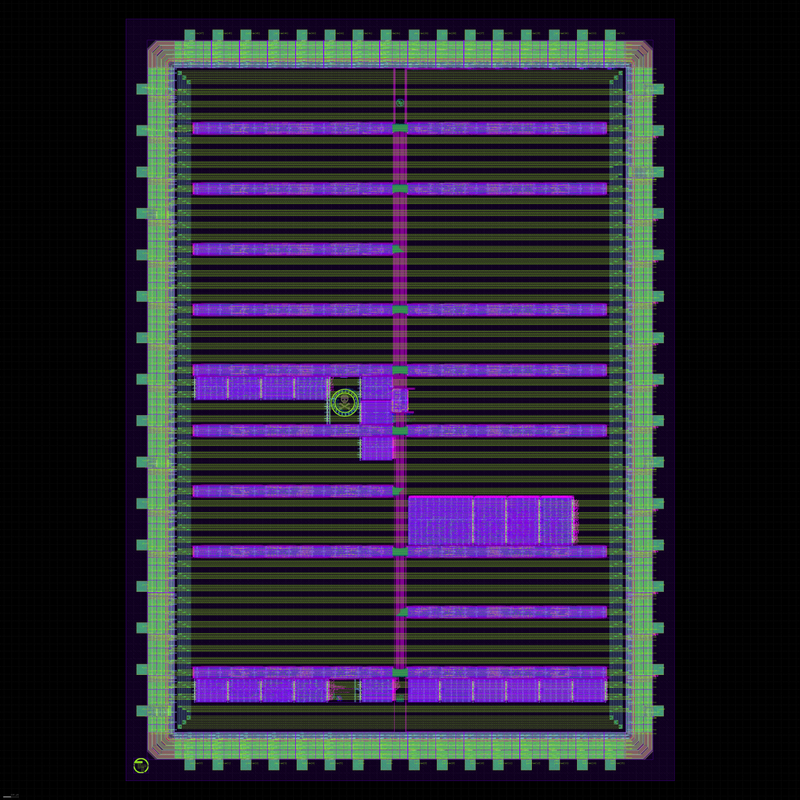
Real Tiny Tapeout shuttle layout (Shuttle - IHP26A) showing multiple designs(including mine) combined into one manufacturing run. Each colorful section is someone's chip: students, hobbyists, researchers all sharing the same silicon :)
What makes Tiny Tapeout special isn't just that it's affordable. It's that you're using the exact same tools and flows that industry uses. You're not playing with toy simulators or fake environments. You're designing real chips, following real constraints, and getting real manufactured silicon at the end. That's the ultimate validation.
If you've been following along with the tools in this post—Verilator, Yosys, OpenROAD then Tiny Tapeout is where you put them all together. It's the final level of the training arc: from simulating logic gates to holding a physical chip with your design etched into it.
Closing: The Only Question Left Is "What Will You Build?"
A decade ago, you needed a million-dollar lab to design a processor. Today, you need a laptop and curiosity.
The tools are here. The cores are open. The community is waiting.
You've seen the philosophy here. You've seen the tools in this post. In the next post, we'll go deep into pipelines, out-of-order execution, hazards, caches, and the real magic happening inside modern processors. We'll talk about how I approached building RISCape, the challenges I faced, and what I learned about computer architecture along the way.
But for now? Start small. Run the tools. Let things break. The rest follows.